訊號流 × 配電拓撲
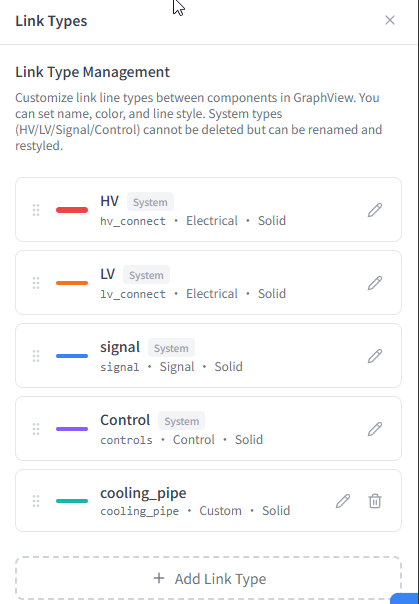
高壓、低壓、訊號、控制 — 內建 4 種預設連接類型,以不同顏色和線型區分。可自訂 LinkTypeDefinition 擴充新的關係類型。
每條連接線可附帶自訂屬性(如電壓範圍、頻率、協議),在圖上直接顯示。
- HV / LV / Signal / Controls 預設 Link Type
- 顏色 × 線型自動區分
- 自訂 LinkTypeDefinition 無限擴充
- Link 上可附加屬性 (Attribute)
以 SysML Block Diagram 風格呈現組件間的訊號流、電力連接與控制關係。拖曳佈局、自訂連接線類型,一眼掌握整個系統的拓撲架構。
高壓、低壓、訊號、控制 — 內建 4 種預設連接類型,以不同顏色和線型區分。可自訂 LinkTypeDefinition 擴充新的關係類型。
每條連接線可附帶自訂屬性(如電壓範圍、頻率、協議),在圖上直接顯示。
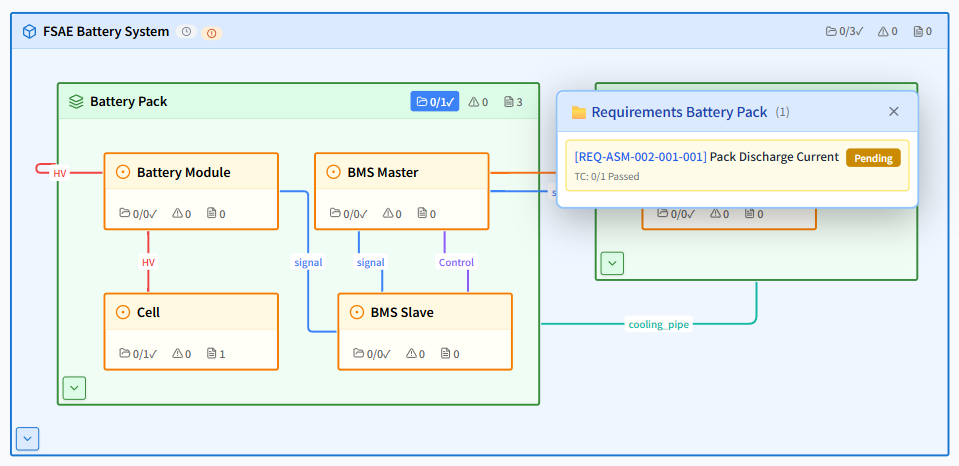
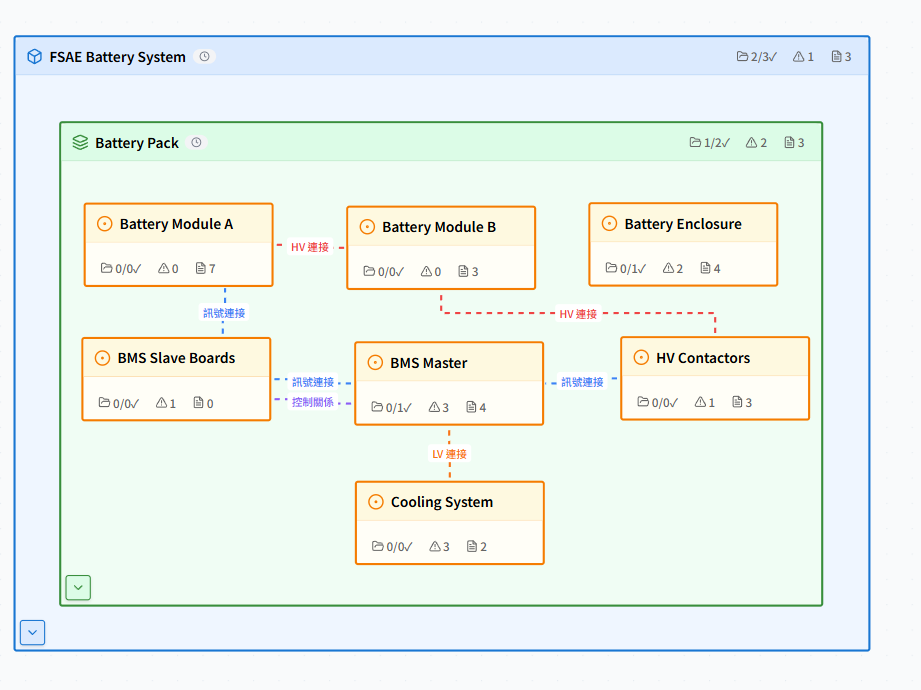
組件節點支援自由拖曳定位,系統自動記憶位置。可一鍵自動排列,根據 BOM 階層層級產生最佳佈局。
支援展開/收合子系統,專注檢視特定區域的拓撲關係。
區塊圖的視覺化表達遵循 SysML 區塊定義圖 (BDD) 概念。每個組件顯示為結構化區塊,包含類型、屬性摘要與連接端口。
可搭配 Onshape API 同步幾何參數,在區塊圖上直接呈現 CAD 參數值。
開啟 Demo 專案,拖曳體驗即時的組件關係圖。
A system architecture block diagram shows how components connect and interact — HV power, LV power, signal lines, control links, and mechanical connections. NIL-MISS Block View provides drag-and-drop diagrams similar to SysML IBD, without requiring SysML expertise.
6 types: HV connect (high voltage), LV connect (low voltage), signal (CAN/LIN/Ethernet), controls (software control), mechanical, and fully custom user-defined link types. Each has distinct visual styling for clear system architecture communication.
Yes. Every component in Block View is the same component as in the BOM table. Requirements, DFMEA items, test cases, and parametric checks are all visible per component — you see requirement coverage directly on the architecture diagram.
Yes. NIL-MISS provides a SysML-inspired block diagram view completely free, fully connected to BOM, requirements, and DFMEA — no expensive modeling tools required. Start free at nilmiss.com.